Build a durable agent on Amazon Bedrock AgentCore
This guide deploys a Strands agent as a Temporal Serverless Worker on Amazon Bedrock AgentCore Runtime. The agent uses Amazon Bedrock for model inference and AgentCore Code Interpreter to run Python.
If you already have an AgentCore application and are only interested in deploying a Worker Runtime, see Deploy a Serverless Worker on Amazon Bedrock AgentCore Runtime. This guide uses a complete agent sample to explain why the Workflow, Activities, Runtime, and Worker Deployment are structured this way.
What you will build
You will build an agent that can respond to prompts by using Amazon Bedrock for model inference and AgentCore Code Interpreter to run Python when needed. The sample accepts one prompt and runs one Workflow Execution. The Workflow asks the model to answer the prompt. The model can call Code Interpreter through a Temporal Activity before returning its answer.
Your Temporal Client starts the Workflow. When the Task Queue needs a Worker, Temporal starts an AgentCore Runtime session. The Worker processes the Workflow and Activity Tasks, then drains after 60 seconds without an Activity starting or finishing.
The sample handles one turn so the tutorial can focus on deployment. Both the model request and Code Interpreter call run as Temporal Activities. If the Worker stops before an Activity completes, Temporal can retry the Activity on another Worker according to its Retry Policy.
Architecture
Temporal Cloud owns the agent's execution state and capacity control. The application starts or signals the Workflow. The Workflow records agent decisions and schedules model and tool work as Temporal Tasks. When the Task Queue needs capacity, the Worker Controller Instance (WCI) starts AgentCore Runtime sessions.
Each Runtime session hosts a Temporal Worker that polls the versioned Task Queue. Workers can call AgentCore services, but the sessions and their process-local state remain replaceable. The sample in this guide uses AgentCore Code Interpreter. It does not use every AgentCore service shown in the reference architecture.
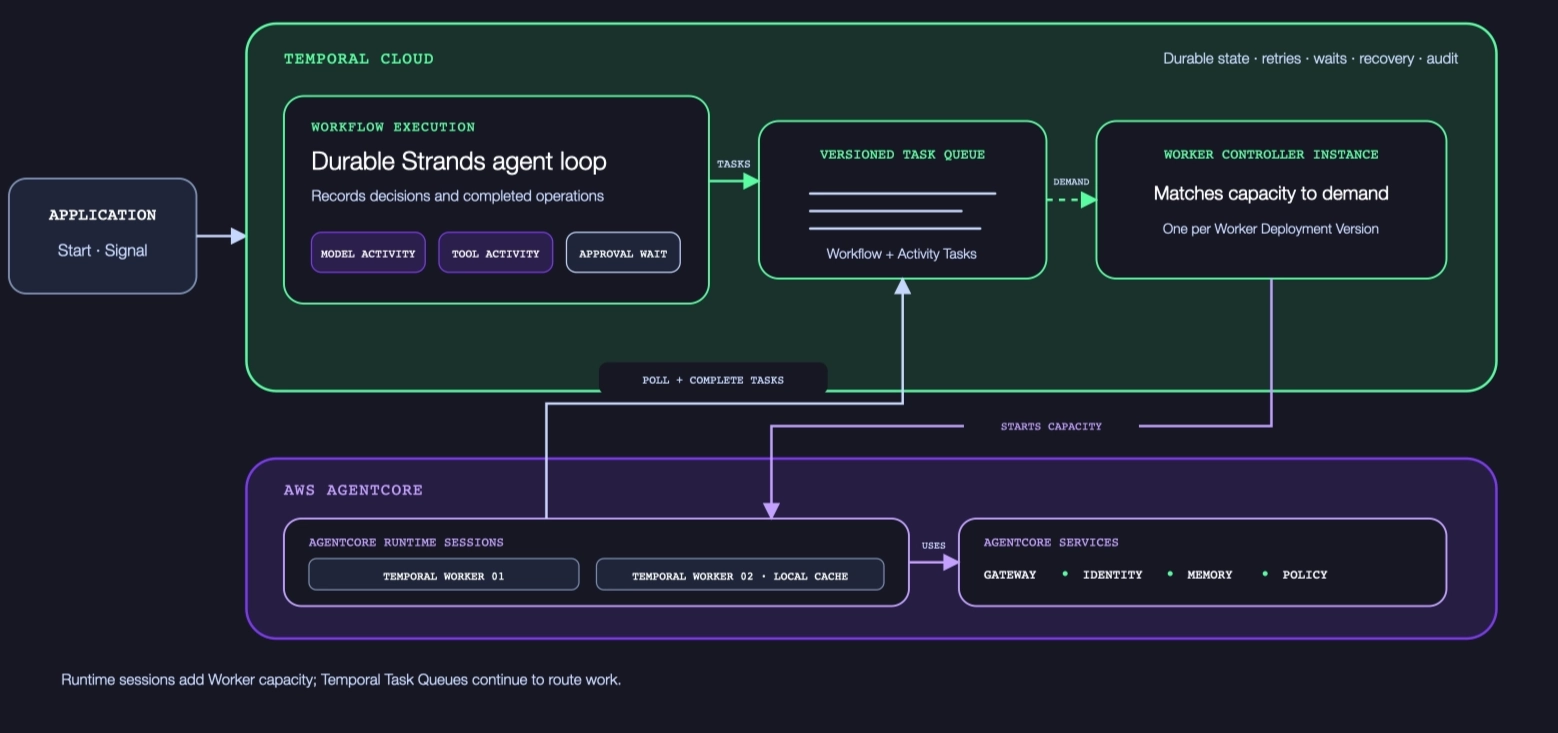
Temporal coordinates agent execution and starts Worker capacity on AgentCore Runtime.
Place state according to how long it must remain available:
| State | Location | Reason |
|---|---|---|
| Agent progress and bounded working context | Temporal Workflow | Temporal reconstructs Workflow state from Event History when another Worker continues the execution. |
| Model calls and tool operations | Temporal Activities | Each operation gets its own timeout, Retry Policy, and recorded result. |
| Large conversations, uploads, and generated artifacts | External durable storage, with references in the Workflow | Large or unbounded data should not cause Event History to grow without limit. |
| Process-local caches and temporary files | AgentCore Runtime session | Runtime sessions are replaceable, so the agent must tolerate losing this state. |
This division is what lets the Workflow outlive any one Runtime session. A Worker can stop after the current work is complete, and a later Worker can reconstruct the Workflow before continuing it.
To extend the sample to multiple turns, use one Workflow ID per conversation and send later prompts to that Workflow through Updates. Any compatible Runtime session can process the next turn.
Prerequisites
- A Temporal Cloud account with an AWS-hosted Namespace and access to the AgentCore Serverless Workers Pre-release.
- A Temporal Cloud API key that can connect to the Namespace.
- Temporal CLI v1.8.3 or later.
- Python 3.10 or later and
uv. - Node.js 20 or later and the AgentCore CLI.
- The AWS CLI configured for your AWS account.
- The AWS CDK installed and bootstrapped in an AgentCore-supported Region.
- AWS permissions to deploy AgentCore resources, CloudFormation stacks, and IAM roles. See IAM permissions for AgentCore Runtime.
- Access to the Amazon Bedrock model that Strands selects in the target Region.
1. Get the sample
Clone the branch from the Strands Agent on Bedrock AgentCore sample PR, then install its Python dependencies:
git clone --branch schoeff/strands-agent --single-branch \
  https://github.com/temporalio/samples-python.git
cd samples-python/bedrock_agentcore/strands_agent
uv sync
The cloned directory contains the Workflow, Activity, Runtime handler, AgentCore configuration, deployment scripts, and IAM template used throughout this guide.
The sample uses AgentCore's CodeZip build instead of a container image. AgentCore packages the Python project and runs it on its managed Python runtime, so this path does not require a Dockerfile. The checked-in files define the application and Runtime settings. The deployment script generates the AgentCore CDK project when you first run it.
2. Examine the agent Workflow
The sample creates a TemporalAgent with a system prompt and the execute_code tool:
bedrock_agentcore/strands_agent/workflows.py
@workflow.defn
class StrandsAgentWorkflow:
    def __init__(self) -> None:
        # Configure with the plugin's default BedrockModel(), custom system
        # prompt and code interpreter tool.
        self.agent = TemporalAgent(
            start_to_close_timeout=timedelta(seconds=60),
            system_prompt=SYSTEM_PROMPT,
            tools=[
                activity_as_tool(
                    execute_code,
                    start_to_close_timeout=timedelta(minutes=2),
                )
            ],
        )

    @workflow.run
    async def run(self, prompt: str) -> str:
        # invoke_async, not agent(prompt) -- the sync form spawns a worker thread the
        # Workflow sandbox blocks.
        result = await self.agent.invoke_async(prompt)
        return str(result)
TemporalAgent adapts the Strands agent loop to run in Workflow code. The Temporal Strands plugin schedules each model
call as an Activity. activity_as_tool makes execute_code another Activity when the model selects that tool.
The Workflow owns the sequence of model and tool decisions because that sequence must resume correctly after a failure. The model calls themselves do not run as ordinary Workflow code. They run as Activities because they perform network I/O, can fail independently, and are not deterministic.
The execute_code Activity creates a Code Interpreter session using the Workflow ID as its session name:
bedrock_agentcore/strands_agent/activities.py
# Use AgentCore Code Interpreter to provide a code sandbox and execute LLM generated solution
@activity.defn
def execute_code(
    code: str, language: LanguageType = LanguageType.PYTHON
) -> dict[str, Any]:
    """Run code in this Sessions's sandbox (workflow ID) and return the Code Interpreter result."""
    interpreter = AgentCoreCodeInterpreter(
        region=os.environ.get("AWS_REGION", "us-west-2"),
        session_name=activity.info().workflow_id,
    )
    return interpreter.execute_code(
        ExecuteCodeAction(type="executeCode", code=code, language=language)
    )
Using the Workflow ID gives each Workflow Execution its own Code Interpreter sandbox.
3. Configure and deploy the Runtime
Open agentcore/aws-targets.json. Replace the account number and Region with the AWS account and Region where you
will deploy the Runtime:
[
  {
    "name": "default",
    "description": "AWS account and Region for the Runtime",
    "account": "<AWS_ACCOUNT_ID>",
    "region": "<AWS_REGION>"
  }
]
Open agentcore/agentcore.json and replace the placeholder values for TEMPORAL_ADDRESS, TEMPORAL_NAMESPACE, and
TEMPORAL_API_KEY. Set AWS_REGION to the same Region used in aws-targets.json. Keep these sample values unchanged:
| Setting | Value |
|---|---|
TEMPORAL_TASK_QUEUE | agentcore-strands-task-queue |
TEMPORAL_DEPLOYMENT_NAME | agentcore-strands-agent-python |
TEMPORAL_BUILD_ID | 1.0.0 |
| Runtime endpoint name | temporal |
These values connect two separately configured systems. The Runtime uses the Task Queue, deployment name, and Build ID when its Worker registers with Temporal. The Worker Deployment Version created in Step 5 uses the same deployment name and Build ID and points Temporal back to this Runtime endpoint. If the values differ, Temporal can start compute that does not register as the version waiting for work.
Putting the API key in agentcore.json keeps the tutorial short. Do not commit the populated file. For a production
deployment, store the key in AWS Secrets Manager and load it when the Runtime starts.
Set the Region for the AWS CLI commands in this guide:
export AWS_REGION="<AWS_REGION>"
Deploy the Runtime and its named endpoint:
./bin/create-runtime.sh
The script creates the AgentCore CDK project on its first run, validates the configuration, packages the sample, and deploys it. The sample uses public network mode so the Worker can make an outbound connection to Temporal Cloud. The named endpoint is for capacity requests from Temporal, not prompts from the application.
Retrieve the Runtime and endpoint ARNs:
export AGENT_RUNTIME_ARN="$(
  aws bedrock-agentcore-control list-agent-runtimes \
    --region "$AWS_REGION" \
    --query "agentRuntimes[?agentRuntimeName=='TemporalStrandsAgent_temporal_strands_worker'].agentRuntimeArn | [0]" \
    --output text
)"
export AGENT_RUNTIME_ID="${AGENT_RUNTIME_ARN##*/}"
export RUNTIME_ENDPOINT_ARN="$(
  aws bedrock-agentcore-control list-agent-runtime-endpoints \
    --agent-runtime-id "$AGENT_RUNTIME_ID" \
    --region "$AWS_REGION" \
    --query "runtimeEndpoints[?name=='temporal'].agentRuntimeEndpointArn | [0]" \
    --output text
)"
echo "$AGENT_RUNTIME_ARN"
echo "$RUNTIME_ENDPOINT_ARN"
Both commands must print an ARN before you continue.
AgentCore creates an immutable Runtime version when you deploy changed Worker code or configuration. The named
temporal endpoint remains on its configured version. When you redeploy the sample, increment
endpoints.temporal.version in agentcore/agentcore.json so the endpoint uses the new Runtime version.
Verify the endpoint version before creating the Worker Deployment Version:
aws bedrock-agentcore-control get-agent-runtime-endpoint \
  --agent-runtime-id "$AGENT_RUNTIME_ID" \
  --endpoint-name temporal \
  --query '{status:status,liveVersion:liveVersion}' \
  --region "$AWS_REGION"
If the endpoint remains on an earlier version, Temporal starts the old Worker code. Creating the Worker Deployment Version can then time out if that code does not acknowledge the invocation promptly or does not register the expected deployment name and Build ID. For details, see AgentCore Runtime versioning and endpoints.
4. Grant Temporal access to the Runtime
Choose an External ID, then use the sample's CloudFormation script to create the IAM role that Temporal Cloud assumes:
export EXTERNAL_ID="$(openssl rand -hex 16)"
export INVOCATION_STACK="ac-strands-invoke"

./bin/mk-invoke-role.sh \
  "$INVOCATION_STACK" \
  "$EXTERNAL_ID" \
  "${AGENT_RUNTIME_ARN}*"
The sample names the IAM role Temporal-Cloud-Serverless-Worker-<stack-name>. An IAM role name can contain at most 64
characters. Keep
INVOCATION_STACK to 31 characters or fewer. The ac-strands-invoke value above is within the limit.
Wait for the stack and retrieve the role ARN:
aws cloudformation wait stack-create-complete \
  --stack-name "$INVOCATION_STACK" \
  --region "$AWS_REGION"

export INVOCATION_ROLE_ARN="$(
  aws cloudformation describe-stacks \
    --stack-name "$INVOCATION_STACK" \
    --query 'Stacks[0].Outputs[?OutputKey==`RoleARN`].OutputValue' \
    --output text \
    --region "$AWS_REGION"
)"
echo "$INVOCATION_ROLE_ARN"
This invocation role lets Temporal get the named endpoint and invoke the Runtime. It is separate from the Runtime execution role that AgentCore created to run the Worker and access Code Interpreter.
Keeping the roles separate gives each side only the permissions it needs. Temporal assumes the invocation role to start capacity. AgentCore assumes the execution role inside that capacity when the Worker calls Bedrock and Code Interpreter. The trailing wildcard on the Runtime ARN allows the invocation role to cover the named endpoint as well as the Runtime.
5. Create the Serverless Worker deployment
The values in agentcore.json configure the Worker inside AgentCore Runtime. They do not configure the Temporal CLI or
the sample client process. Export the Temporal connection values for those processes:
export TEMPORAL_ADDRESS="<namespace>.<account>.tmprl.cloud:7233"
export TEMPORAL_NAMESPACE="<namespace>.<account>"
printf "Temporal Cloud API key: "
read -rs TEMPORAL_API_KEY
printf "\n"
export TEMPORAL_API_KEY
Create a Worker Deployment and a version that points to the AgentCore endpoint:
temporal worker deployment create \
  --name agentcore-strands-agent-python

temporal worker deployment create-version \
  --deployment-name agentcore-strands-agent-python \
  --build-id 1.0.0 \
  --aws-agentcore-endpoint-arn "$RUNTIME_ENDPOINT_ARN" \
  --aws-agentcore-assume-role-arn "$INVOCATION_ROLE_ARN" \
  --aws-agentcore-assume-role-external-id "$EXTERNAL_ID"

temporal worker deployment set-current-version \
  --deployment-name agentcore-strands-agent-python \
  --build-id 1.0.0 \
  --yes
Creating the version causes Temporal to invoke the Runtime and wait for the Worker to register. The deployment name
and Build ID match the values in agentcore.json. Setting the version as current lets it receive new Tasks on the
agentcore-strands-task-queue Task Queue.
The Worker Deployment Version binds one version of the Worker code to one compute configuration. The sample registers
Workflows with PINNED behavior, so a Workflow continues on its assigned version instead of moving to a newer version
while it is running. Marking 1.0.0 as current sends new Workflow Executions to that version.
6. Run the agent
Run the sample client with its default prompt:
uv run python starter.py
Or provide a prompt:
uv run python starter.py \
  "Calculate the first 10 Fibonacci numbers and verify the result with Python."
starter.py starts StrandsAgentWorkflow and waits for its result. Temporal starts AgentCore Worker capacity, the
Workflow calls the model and Code Interpreter Activities, and the client prints the answer. The Workflow then
completes. After 60 seconds without an Activity starting or finishing, the Worker drains.
Starting the agent through starter.py, rather than invoking the AgentCore endpoint, is an architectural choice. The
Temporal Client creates the durable Workflow Execution first. AgentCore supplies a Worker when Temporal has a Task
ready to run.
Inspect the completed Workflow Execution:
temporal workflow show \
  --workflow-id agentcore-strands-workflow-id-1
The Event History contains the model and execute_code Activities. Follow the Worker from AgentCore:
agentcore logs --runtime temporal_strands_worker
The Workflow history and AgentCore logs show the two sides of the integration. Event History records what the agent did. The AgentCore logs show which replaceable Worker process performed the work and when that Worker drained.